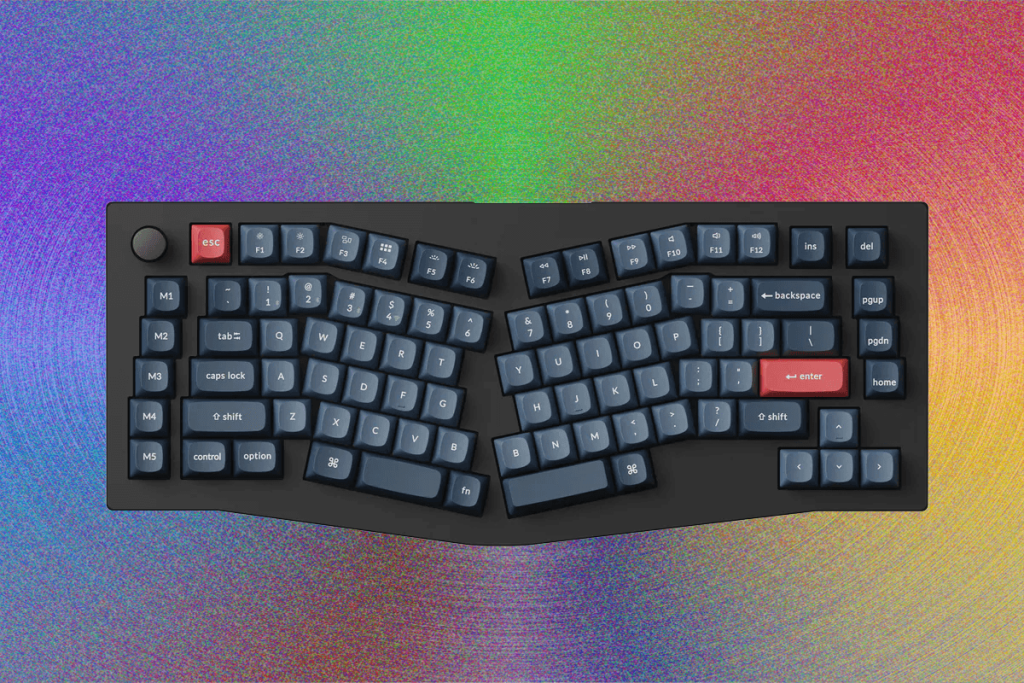
There’s absolutely something to be said for a good keyboard. Having something well-made that feels and sounds good to type on can make the time you spend at your computer feel much more worthwhile. Whether you’re clocking in and working, browsing your favorite forums, or booting up Steam for a gaming marathon, a satisfying and comfortable interface between you and your computer is indispensable.
A lot of great keyboards fall short in one specific way: ergonomics. With non-optimized layouts and limited customization, it’s almost some keyboards are designed to be tough on your wrists. And if you’re spending hours every day in an office chair, you’ll want something that’s been optimized not only for an engaging typing experience but also to keep those long hours of typing from taking an unnecessary toll on your long-term comfort.
While there are countless options with diverse layouts and shapes, all ergonomic keyboards are designed with long-term comfort in mind. By angling out your wrists and spreading your shoulders apart, these keyboards can reduce strain and potentially prevent or alleviate the stress put on the body by typing.
To complement your new ergonomic keyboard, we have a guide to the Best Ergonomic Computer Mice and Best Office Chairs. And in case you realize that ergonomic peripherals aren’t for you, we also have our more-traditional Best Keyboards guide. For other peripherals, we have recommendations for the Best Computer Speakers and Best Computer Monitors.
What Are the Different Types of Ergonomic Keyboards?
While there are countless types of ergonomic keyboards, the most common are typically going to be angled keyboards and split keyboards. Angled keyboards, often referred to as “Alice”-style keyboards in the mechanical keyboard world (named after the TGR Alice), split the alphanumeric keys along the middle, positioning the two halves at an angle from one another while keeping the modifier keys (backspace, enter, shift, and so on) in their standard positions. The angle will vary between keyboards, as will the number of keys, but the main constant in an Alice-style keyboard is that, despite the halves being separated from one another, the keyboard itself is not split. It has one case that all of the keys are held in.
Alternatively, a standard split keyboard does the opposite: A standard split keyboard will keep all of the keys in their standard position (with no new angles) and instead cut the entire keyboard in two, creating two distinct halves that can be moved independently of one another. Some of these keyboards will connect the two halves with a cable, while others will connect them wirelessly. This typically allows for the two halves to be angled, to sit far away from one another, or for only one half to be used (typically for gaming).
Outside of all this, there are also ortholinear keyboards. On a typical keyboard, the keys are staggered instead of being aligned upon a perfect grid. But with an ortholinear keyboard, the keys are aligned along this grid. While this can be more difficult to type on at first, it theoretically enables your fingers to move more naturally, directly up and down to reach other keys instead of moving at an angle. There are both ergonomic and split ortholinear keyboards, and keyboards that use nonstandard staggering instead, the Naya Create.
What Are the Benefits of an Ergonomic Keyboard?
The largest benefit of an ergonomic keyboard is in the name: It is more comfortable and ergonomically beneficial to type on. While this benefit can be felt by anyone, it is most significant for people who spend multiple hours a day at a computer: The repetitive movements and fixed position of typing can put unnecessary strain on the body due to the unnatural position required.
This is most prominent with the angle of the shoulders and wrists. When typing on a standard keyboard, your wrists need to be placed directly in front of your torso at an angle, putting strain on your wrists and hands. Instead of forcing your wrists to sit at an uncomfortable angle, an ergonomic design will put the two halves of the keyboard at an angle, allowing your wrists to sit more naturally.
What Are the Benefits of a Split Keyboard?
If you don’t care for the angle that an ergonomic keyboard has you typing at, or if you want to optimize further, a split keyboard could be the solution. When typing on a single-piece keyboard, even when angled, you need to bring both of your hands in front of your chest, close to one another. This position can put strain on your shoulders and back when done over a prolonged period of time. A split keyboard aims to solve this by allowing you to move the two halves of the keyboard further apart, with them potentially sitting in front of either shoulder. An added secondary bonus is the ability to angle the two halves of the keyboard however you see fit.
Is There a Significant Learning Curve?
While this really depends on the individual, there can be anything from a mild adjustment period to some more serious confusion. Personally, I find the transitional period between any keyboard with a somewhat-standard QWERTY layout to be fairly quick, since all of the keys are in positions at least somewhat-close to what I expect. However, even I struggle with more “strange” layouts those found on ortholinear keyboards. After years of typing on standard keyboards, the familiar naturally becomes more familiar, and the unfamiliar can feel truly alien. However, if you are genuinely passionate about a new layout, I’ve often found that the transitional period is well worth the end result of using something that you really enjoy. It might suck for a bit, but don’t let that stop you!
Are There Any Other Downsides to These Keyboards?
Because these keyboards tend to have more space between the keys, they might not be as optimal for gaming. The WASD keys are split at an angle on an ergonomic keyboard, and it will be slightly more difficult to reach keys on the right-hand side of an ergonomic keyboard, and with some split keyboards, it can even be impossible to press certain keys when only using one half. Because of this, if nothing else, you’ll ly become more familiar with the key assignments menus in your favorite games. If you’re playing an older title that doesn’t have these kinds of settings, you might find yourself entirely out of luck.
How We Test
For each of the keyboards on the list, I spend anywhere from a few days to a week testing every aspect of its performance and usability. This includes typing, gaming, multimedia editing, general browsing, and general productivity work with spreadsheets, text documents, and the . I also experiment extensively with any bundled software, testing to ensure all the features work properly and that there’s nothing missing. During this process, I take extensive notes and pay attention to where each keyboard performs well, where it runs into difficulties, and what kinds of quirks I run into during testing.
Once I’m done testing, I compare each of the keyboards I’ve tested, looking at important metrics build quality, typing experience, customizability, and repairability. While these metrics are fairly objective, there are quite a few subjective ones as well: Comfort, size, aesthetics, and layout preference will ultimately depend on the individual user, so I try to focus on a keyboard’s intended use case and general appeal instead of focusing on my personal preferences.
Ultimately, my decisions are made primarily based on the keyboard’s functionality, build quality, and longevity. I aim for each pick on this list to not only start out good but to stay good for a long time.
-
Best Alice-Style Ergonomic Keyboard

Photograph: Henri Robbins
to wishlist Keychron
V10 Max
Amazon
Keychron
This keyboard has a traditional Alice-style ergonomic layout with gasket mounting, a great typing sound, and smooth switches from the factory. The layout can be a bit unusual at first, but with dual “B” keys on either side and two separate function layers with dedicated keys, it’s easy to acclimate to this keyboard and fine-tune the layout to your preferences.
other models from Keychron, the gasket-mount system is soft and comfortable without being over-the-top, and the spherical keycaps, while a bit tall, feel natural to use even for prolonged typing sessions. The plastic case feels sturdy in hand without being too heavy, and exposed hex screws on the underside look stylish while also making customization (and repairs) easy. Compared to the Q series’ metal case, the V8 has the advantage of flip-out feet to adjust the keyboard’s angle. The keycaps are all fairly standard, meaning you can easily find replacement keycaps (just be sure they have a split spacebar included, or pick a keyset with an add-on spacebar kit), and the switches are hot-swappable as well. The only real downside is that the layout and lighting can’t be customized wirelessly. Instead, you need to disconnect from 2.4 GHz or Bluetooth and connect the keyboard to your device with a USB cable.
Specs: Switches Linear, Tactile, or Clicky Connectivity Wireless (2.4 GHz or Bluetooth), Wired In the Box USB-A to USB-C cable, 2.4 GHz dongle Operating System Keycaps Windows and Mac Layout Ergonomic 75 percent -
Add Some Aluminum

Photograph: Henri Robbins
to wishlist Keychron
Q8 Max
Keychron
While Keychron’s main V-line offerings are as much as the average person needs, there are pricier options from the brand if you want a bit more of a premium typing experience.
Keychron’s Q8 and Q10 are both up-market offerings that maintain the same Alice-style ergonomic layout and gasket-mount system, while swapping the lightweight plastic case for a heftier all-metal housing. The result is a denser keyboard and a more durable shell, with improvements to both typing sound and feel.
While I can’t say that spending twice as much results in a keyboard that’s twice as good (this keyboard sits well into the realm of diminishing returns), it’s a fantastic upgrade that can be worth the extra money if you’re after a keyboard that feels and types a premium product.
Specs: Switches Linear, Tactile, or Clicky Connectivity Wireless (2.4 GHz and Bluetooth), Wired In the Box USB-A to USB-C cable, 2.4 GHz dongle Operating System Keycaps Windows and Mac Layout Ergonomic 65 percent
-
Best Split Keyboard

Photograph: Henri Robbins
to wishlist Dygma
Raise 2
Dygma
While it’s easy to gawk at the price of this keyboard (we’ve listed the starting price, but fully loaded it tops out above $600), it really does have everything you could ever want. Both sides have independent wireless connectivity, there are options for tactile, clicky, and linear switches, and both the software and add-ons allow for extensive customization. Plus, this is one of the rare keyboards on this list that has dedicated ISO support.
This model definitely falls on the far end of the price range, and because of that, I can only really recommend it if you want something with extensive customization and zero cut corners. You’re paying a premium here not only for the metal case but also for the care that has gone into designing every aspect of this keyboard, from the magnetized wrist rest pads to the in-depth customization software.
Specs: Switches Linear, Clicky, or Silent Tactile Connectivity Wired with Optional Wireless (Bluetooth w/ Dongle) In the Box Carrying Case, USB-C cables, USB-C to USB-A Adapter Operating System Keycaps Windows or Blank Layout Split 65 percent -
Best for Gaming
-

Photograph: Henri Robbins
-

Photograph: Henri Robbins
-

Photograph: Henri Robbins
-

Photograph: Henri Robbins
Chevron Chevron to wishlist Asus
ROG Falcata
Best Buy
Of all the split and ergonomic keyboards I’ve tested, the Asus Falcata is the only one to be fitted with Hall effect switches, which really puts it in a league of its own for gaming.
The switches are immensely customizable, with settings to adjust actuation distance, Rapid Trigger, Simultaneous Opposed Cardinal Direction movement, and multiple inputs per key. The keyboard also has ultra-fast 8,000-Hz polling and multiple accessories included, such as multiple sets of screw-in feet to adjust the typing angle and tenting, detachable wrist rests, and extra cables to prevent unnecessary slack between the two halves.
My only real gripe with this keyboard is the limited wireless connectivity. While the left side of the keyboard can connect to your computer wirelessly, the right side has to be connected to the left with a physical cable.
While this is the only Hall effect keyboard on this list, it doesn’t mean it won this spot by default—this is still a good keyboard, and if it weren’t, it would have found a home in the “Avoid This” section below.
Specs: Switches Linear Hall Effect Connectivity Wireless (2.4 GHz), Wired In the Box USB-A dongle, multiple USB-C to USB-C cables, USB-A to USB-C adapter, USB-A 2.4 GHz dongle, detachable wrist rests, screw-in feet for height adjustment Operating System Keycaps Windows Layout Split 75 percent -
-
Best for Work

Photograph: Henri Robbins
to wishlist Keychron
K15 Max
Amazon
Keychron
One of the few low-profile options, the K15 Max is easy to slip into a backpack or bag if you need something portable for work. The layout, being slightly larger than other Alice-style keyboards, includes a dedicated function row and a set of remappable macro keys to the left side of the keyboard, allowing for more efficient productivity-focused use.
The switches on this keyboard still feel great despite being low-profile. There are options for linear, tactile, and clicky switches, and the linear switches I tested felt smooth and had a reasonably long travel distance when compared to some other low-profile switches. The typing sound, while not anything special, is clean and refined, and the stabilizers are properly tuned and lubed from the factory, without any ticking or rattling.
Specs: Switches Low-profile Clicky, Tactile, or Linear Connectivity Wireless (2.4 GHz or Bluetooth), Wired In the Box USB-A to USB-C cable, 2.4 GHz dongle Windows and Mac Layout Ergonomic 75 Percent
Honorable Mentions

Photograph: Luke Larsen
Lemokey L0 HE 8K for $160: When gaming, you’ll be glad to know that there’s a perfect option for that. Compared to the ROG Falcata, the L0 is half the keyboard for half the cost. While it obviously can’t be your only keyboard, on account of the … limited keys, it cuts down the horizontal real estate of a standard keyboard while being packed with a high polling rate, fully adjustable Hall effect switches, and a black-and-green gamer aesthetic that’s a bit silly but lots of fun.
Avoid These

Photograph: Luke Larsen
Keychron Q11 for $250: While this is a perfectly functional split keyboard, I find it hard to justify the price. Primarily, the typing experience is incredibly underwhelming, feeling and sounding thin and hollow. The typing angle of this keyboard feels fairly shallow, with no way to adjust it, and even partial wireless support (with one half connecting wirelessly and the other connecting to the “main” half) is absent—something that has come to be standard on the majority of Keychron’s offerings. This isn’t a bad keyboard, but at this price it doesn’t feel on par with Keychron’s non-split offerings. Ignoring the price, this keyboard is lacking in both practical and ergonomic features.

Photograph: Luke Larsen
Naya Create for $500+: In theory, I really d this keyboard. It does a lot of fantastic things design-wise, has a great concept with the modular attachment system, and looks awesome on your desk. However, the layout had too much of a learning curve for most users, and that learning curve was made worse by the keyboard’s inconsistent-at-best functionality and underdeveloped software package. While this keyboard could easily overcome most of its flaws with updates to the software and firmware, I can’t recommend it in good faith until those updates and changes actually come.
Power up with unlimited access to WIRED.Get best-in-class reporting and exclusive subscriber content that’s too important to ignore. Subscribe Today.

Henri Robbins is a WIRED contributor specializing in mechanical keyboards and PC peripherals. He also reviewed hardware for Input and Inverse. He graduated from Miami University, where he studied journalism, media and communications, and photography. He resides in Cincinnati. … Read More
TopicsShoppinghow-tobuying guidesAccessories and Peripheralskeyboardsmechanical keyboards

The Best Gaming Laptops to Buy, Across Every Budget
We tested the latest and greatest gaming laptops, and whittled our list down to the six absolute best you can buy right now.

The Best AI Notetakers to Record Your Meetings, Interviews, or Classes
A growing collection of pocket-sized gadgets lets you record your meetings and extract value from them. Here are our favorites.

The 8 Best Space Heaters of 2026. I Tested Dozens to Find Them
These portable heaters will heat a room quickly, quietly, and safely.

The Best Mattress Toppers You’ll Ever Sleep On
These toppers will transform your mattress into exactly what you need, whether that’s a super-plush pillow top, memory foam, or targeted back support.

The Best Computer Monitors to Upgrade Your Desk Setup
The Gear team spends countless hours in front of displays while writing for you. So we reviewed those too (including a portable screen).

The Best MicroSD Cards I’ve Tried
Everything you need to know about memory cards for cameras, video game systems, and more.

The Cordless Vacuums Made for Your Entire Home
Clean your house without the constraint of a power cord with these cordless stick vacuums.

All the Best Vacuum Cleaners We’ve Ever Tried
Looking for all our top recommended vacuums? Here are our favorites in every style we’ve tested, from stick vacs to robot vacuums.

The Best Accessible Sex Toys for All Types of Bodies (and Abilities)
From app-controlled toys to mounts and wearables, I tested a variety of sex toys for every type of body and ability.

These Are the 7 Best OLED TVs We’ve Ever Tested
Looking to step up to the TV big leagues? These are the best OLED TVs you can buy.

Which Apple Watch Is Best Right Now?
Should you splurge on the new Series 11, or will the SE 3 do? Let us help you figure out which version to get (and which to avoid).

The Best Duffel Bags for Commuters and Overpackers
Need to schlep some stuff? Consider these field-tested duffel bags. The Eastpak Duffel Pack S Tarp Black2 is our top pick.
Wired Coupons

Squarespace Promo Code
Squarespace Promo Code: 20% Off Annual Acuity Subscriptions

LG Promo Code
LG Promo Code: 20% Off Your First Order

Dell Coupon Code
10% Off Dell Coupon Code for New Customers
.png)
Samsung Promo Code
30% Samsung Coupon – Offer Program 2026

Canon Promo Code
Up to $500 Off Canon Cameras

Doordash Promo Code
50% Off Doordash Promo Code For New & Existing Users
Sumber Artikel:
Wired.com