Text settings
Story text
SmallStandardLargeStandardWideStandardOrange
* Subscribers only
Learn more
Google’s I/O conference is next week, and we expect to hear a lot about the company’s AI endeavors. The company says there’s so much to talk about that it’s spilling the Android beans a little early, and yes, a lot of AI is involved. In the coming months, Google will roll out more smartphone AI features under the Gemini Intelligence banner, bringing more automation and customization to your phone.
App automation will be a major element of Android going forward, Google says. Automation for apps is expanding after Google began testing it earlier in 2026 with DoorDash and Uber on Pixel and Samsung phones. It was a very frustrating experience at launch, but Google says it has spent the intervening months fine-tuning the system.
Google promises that Android will be able to handle more complex automations across apps. For example, the robot could find a course syllabus in Gmail and then hop to a shopping app to add the necessary books to your shopping cart. Google also suggests taking a picture of a travel brochure and telling Gemini to book something similar in the Expedia app.
New app automations
This could theoretically reduce busy work, but that’s only true if it works and your task takes advantage of the right apps. Android won’t just automate any old app on your phone. The automation will only work in select apps, mostly limited to food and grocery ordering and ride-hailing. For everything else, there’s Chrome.
The Gemini-powered Auto Browse feature that debuted on desktop Chrome several months ago will launch on Android toward the end of June for all Android 12 and higher devices. This feature uses powerful cloud-based Gemini models to parse webpages and handle multi-step tasks for you.
We were not overly impressed with the speed or accuracy of Auto Browse in desktop Chrome, but simpler, mobile-optimized pages might be a little more usable for the robot. the desktop version, you’ll be able to watch the AI navigate the web for you or let it do its thing in the background until your authorization is needed for something sensitive.
Auto Browse on Android
Similarly, the Autofill system in Android is getting an AI automation upgrade. Google says Autofill with Google will soon plug into Gemini’s Personal Intelligence, allowing it to fill in more information when you encounter an online form. It can still handle your name, address, and other established personal details, but it may also be able to add data your car’s license plate. Google says the feature is opt-in, so you can keep the traditional autofill experience.
Gemini is all ears
Gemini Intelligence is also powering some new convenience features in Android, including those rumored AI-generated widgets. Google calls that “Create My Widget,” but don’t expect miracles here. These widgets appear mostly to be about displaying data from your account or around the web.
AI-generated widgets
For example, Google says you might want a widget that recommends meal plans on a set schedule or sets a countdown to an important event. You can do that with Create My Widget. You can even mix and match the kinds of included data. Android will offer suggested recipes for new AI widgets, but you can also simply enter a prompt describing what you’re looking for. Perhaps you want to see a countdown widget with specific weather metrics—that should be possible with Gemini-powered widgets. No matter how you make them, the widgets are fully Material themed and resizable.
Google is also bringing more AI to voice input with a feature called Rambler, which is integrated with Gboard. Plenty of people already use AI to polish text in emails or other documents before sending them, and this is essentially the same thing for voice input. With Rambler, you can just start talking—or rambling, if you will—and the AI will get the gist of what you say. All the “ums” and “uhs” will go away, and the final result will essentially become a summary of what you said.
Rambler fixes your words on the fly
The company claims that Rambler will understand the context and nuance of what you’re saying, so the end product still sounds you. There will be a prominent indicator when Rambler is enabled, and Google promises that no audio or text will be retained.
Android in cars
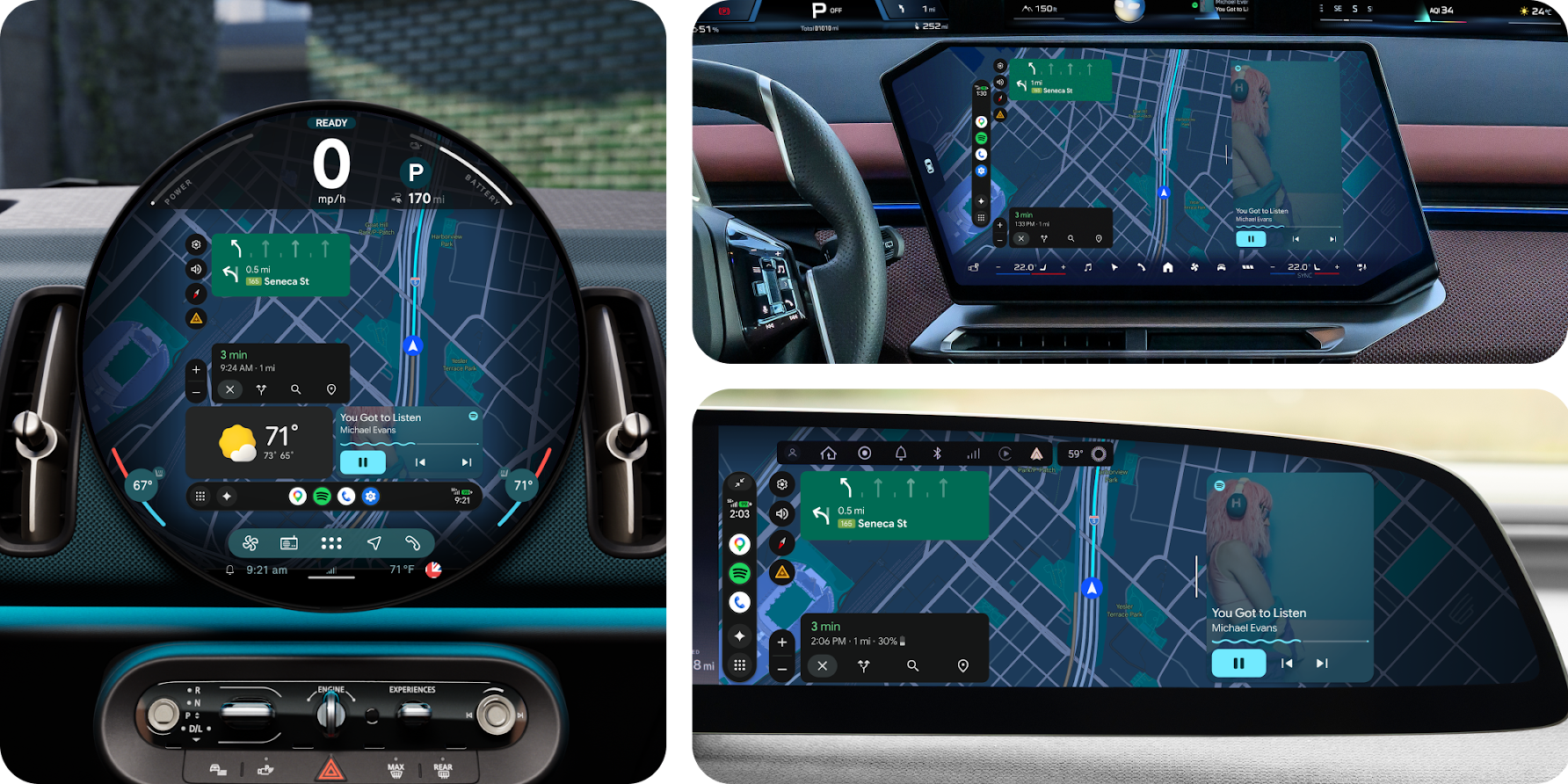
Plugging your Android phone into a car that supports Android Auto will be different soon, too. For starters, Google says Android Auto will now adapt to varying display sizes and shapes. So even if your car has a weird polygon screen, Android should fill it completely.
Credit: Google
Credit: Google
What you see on that screen will be different, too. Android Auto is getting a makeover with greater support for Material 3 Expressive themes and a new navigation experience. Yep, Immersive Navigation, which Google announced earlier this year, is almost ready to actually roll out to users. Accessing data from other apps in the car will be easier as well due to the addition of widgets. Google says there will be widgets for contacts, weather, and select third-party apps. For cars with Google built in, the vehicle’s cameras will plug into Maps to provide more accurate lane guidance. Gemini will also be able to answer questions about the vehicle’s status, including warning lights and cargo capacity.
Android Auto media apps have hardly evolved over the years, but 2026 will bring some notable changes. Popular apps YouTube Music and Spotify are getting design overhauls that make them easier to use in the car. Video playback is also coming to Android Auto for the first time. Naturally, this will only work when you’re parked and using a supported app YouTube.
Video to audio transition in Android Auto
Google says Android Auto will switch seamlessly to audio-only mode when you start driving, but this requires buy-in from automakers for safety and technical reasons. Video will only be available in supported cars from BMW, Ford, Genesis, Hyundai, Kia, Mahindra, Mercedes-Benz, Renault, Škoda, Tata, and Volvo. More vehicles may come later.
What about Android 17?
Google has announced all these new Android features while barely mentioning Android 17, which is slated to launch in June. Almost everything new in Android will arrive via Play Services, app updates, or on specific devices (Pixel and Samsung Galaxy) through partnerships.
There are a few tidbits for Android 17 itself. Google says flagship Android 17 devices will see some changes to the camera experience, including better video quality in social media apps Instagram and “screen reaction” overlays in video. There will also be native support for Ultra HDR, native stabilization, and Night Mode in the Instagram Edits app on Android 17 devices.
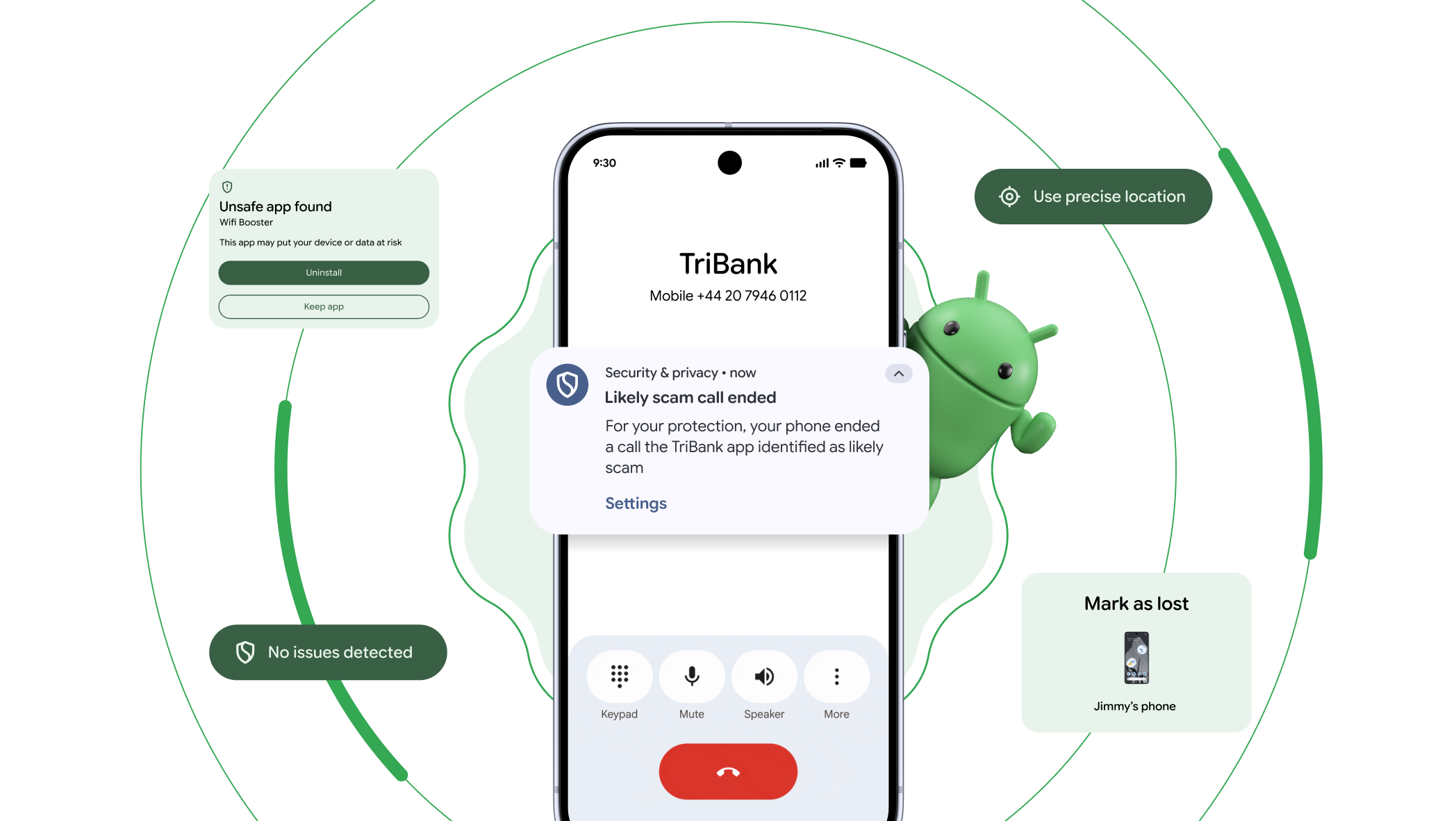
Only a few of the new features are tied to Android 17.
Credit: Google
Only a few of the new features are tied to Android 17. Credit: Google
On the security front, Google will enhance lost device features to require both a PIN and biometric unlock to better prevent bad actors from using your device. This will disable quick settings and block new Wi-Fi and Bluetooth connections. Android 17 will also get a new option for location access, allowing you to your precise location with an app only for the current session. A new location indicator, similar to the ones for the camera and microphone, will make it clear when an app is accessing your location.
There’s also Pause Point, which lets you add a 10-second cooldown timer to apps you’ve labeled as distracting. This will be bundled into the existing Digital Wellbeing suite.
Lastly, Google has redesigned its emoji yet again. No, the blobs aren’t coming back. Emoji now have a more detailed 3D appearance, but you’ll see them first on Pixel devices over the summer. Other Android 17 devices will have to wait until “later this year.” Most device makers craft their own emoji, so you may never see Google’s new smileys outside of apps YouTube and Gmail.
Ryan Whitwam Senior Technology Reporter
Ryan Whitwam is a senior technology reporter at Ars Technica, covering the ways Google, AI, and mobile technology continue to change the world. Over his 20-year career, he’s written for Android Police, ExtremeTech, Wirecutter, NY Times, and more. He has reviewed more phones than most people will ever own. You can him on Bluesky, where you will see photos of his dozens of mechanical keyboards.
Sumber Artikel:
Arstechnica.com