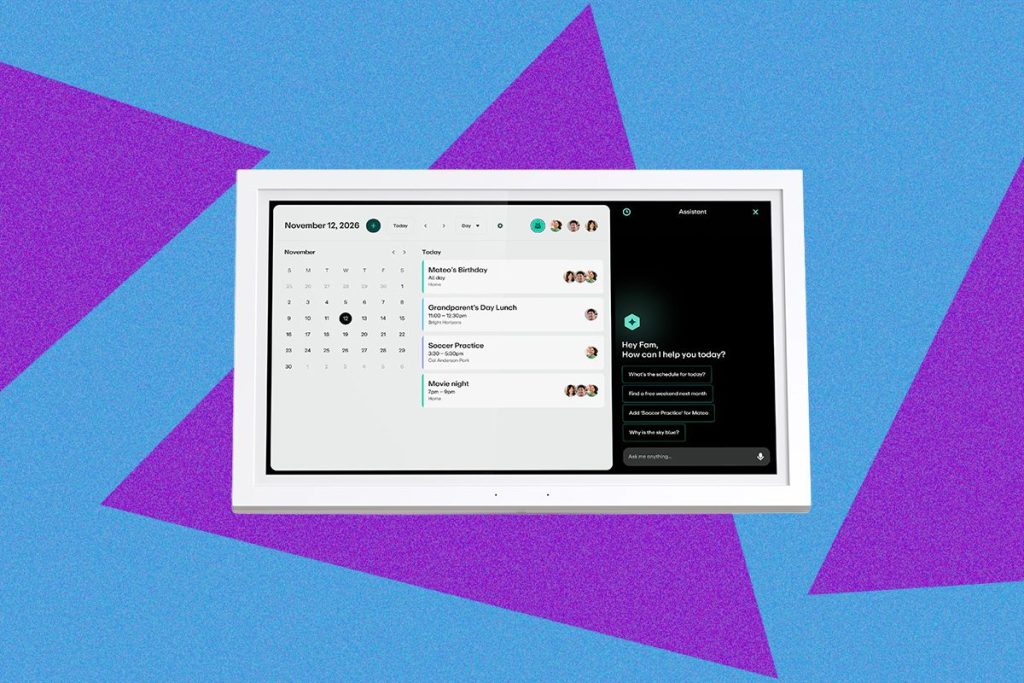
I set up a digital wall calendar at a friend’s house a couple of months ago. Her first question was one I’ve constantly asked myself as I test these devices in my own home: “Does it have a voice assistant?”
It feels the one thing missing from these devices. Digital wall calendars have been on the rise in popularity this year, driven by the popularity of the Skylight Calendar. After testing multiple models in my own home, I can see why. These devices take any and all of the digital calendars you already have (Google Calendar, iCalendar, Outlook Calendar—you name it) and put them onto a single device in your home.
It’s great if you’re my husband and me, who live by our Google Calendars but don’t want to be tied to our phones when discussing plans. These devices can also double as household management tools with meal planning, chore trackers, to-do lists, photo screen rs that double as a digital photo frame, and even financial management for your kids if you go with the Greenlight Family Hub.
-

Photograph: Nena Farrell
-

Photograph: Nena Farrell
-

Photograph: Nena Farrell
Greenlight
Family Hub
Amazon (15.6 Inch)
Greenlight (With Family Hub+)
The Greenlight Family Hub has been an interesting device in the world of digital calendars because of how many features it offers. It not only adds financial management, as the company was originally a banking tool for parents and their teens, but family location tracking, which uses the Greenlight app on a family member’s phone to show their location, or a GPS tracker that you can separately purchase for younger children.
But there’s one feature behind the paywall (a $10-a-month membership) that finally satisfies the thing I’ve always wanted: a voice assistant.
Greenlight’s proprietary voice assistant has been both easy to use and has given smart, thoughtful answers. So why isn’t there a voice assistant in every digital wall calendar? And conversely, why haven’t smart displays that do have smart voice assistants gained features full-page calendars and chore charts?
Not Just a Calendar
Video: Nena Farrell
Part of what makes Greenlight’s hub different from other digital calendars is that the company is using the calendar as a starting point for the offerings it already has. That’s also why it’s called the Family Hub instead of just a calendar most other devices I’ve tested. Greenlight grew from a banking tool to a way to manage chores and money for kids and teens, and has now become a full family management platform where you can track your family’s calendars, chores, kids’ spending, and even family locations.
Greenlight says it noticed the lack of voice support among competitors’ offerings and baked that into its hub intentionally. “Voice assistants have been around for over a decade, yet when building the specs for Family Hub, we noticed that voice support was absent in the digital calendar market,” says Sushil Sharma, chief product officer at Greenlight. “Our goal with Hub was to create an all-in-one command center for busy families to engage with technology in a way that feels natural and seamless. By combining a voice assistant feature with a centralized home display, we are able to limit the number of devices families need in their home.”
It’s also smart for families with younger children—Sharma pointed out that not all kids can read and type fluently, and voice support makes it more accessible for them and the rest of the family. But it’s also a way people are expecting to interact with their home devices after years of smart speakers and smartphones offering voice support.
Voice Report

Photograph: Nena Farrell
Greenlight’s assistant reminds me of the modern, AI-powered iterations of Alexa and Google because it’s also powered by AI. Greenlight says its family AI assistant uses frontier large language models with Greenlight’s own proprietary safety tools that it designed with family safety in mind. That means the assistant shouldn’t get into sensitive or inappropriate topics (or accidentally tell your child Santa isn’t real) but will both schedule a timer and answer day-to-day questions. You’ll also see a conversation appear on the right-hand side, reminding me a lot of the Alexa+ experience on an Echo Show device.
Greenlight’s Hub is supposed to only wake at its wake phrase, “Hey Greenlight,” but in the days I’ve been testing it, I’ve found it to be a little sensitive and ly to wake at random. It also tends to keep listening, waiting to see if you’ll continue the conversation or give a new command, so if my family is having a general conversation after asking a question, Greenlight will try to pick up a question from that and answer it. I find myself often ordering Greenlight to stop.
That isn’t an issue just for Greenlight. My Google Gemini-powered smart speaker does the same thing, and both my son and I are quick to yell, “Google, stop!” to get it to stop trying to answer a question we didn’t ask. It’s a problem with these AI-powered voice assistants overall, but I’m finding I’d rather say the wake word multiple times than get interrupted.
Big Brother Energy

Photograph: Nena Farrell
When I described to my editor the laundry list of features that the Greenlight Family Hub has, she said it sounded a “Big Brother machine.” I see why, of course—tracking your location and financial information in a device that sounds a simple calendar might come as a surprise to most people. It was certainly a surprise to me when I went to set up the hub through the app and ended up stuck on the financial pathway (Greenlight says it’s fixing this issue in the app but I had to have support clear my information so I could set up the hub without setting up a bank card for my child).
Still, I how much it has to offer, even if it might feel a tad Big Brother-y for some. And while it does have a microphone, it doesn’t have a camera most smart displays have, so in that sense it feels less creepy to me than other devices I’ve had in my home.
I also really that most of the features are accessible without needing a premium subscription—notably the photo screen r feature, which Skylight will charge you for. (Skylight’s business model in general has become charging for storage, for both its calendars and digital photo frames.) Greenlight charges instead for its AI assistant and voice interaction, along with family location sharing. If you’re less voice-inclined than I am, you’d be plenty happy with this hub without the premium subscription.
I am hoping we see more digital wall calendars add at least some kind of voice assistance, as well as offering some control of your smart home devices. Maybe I’m biased coming from a background in smart home technology, but it feels a huge missed opportunity. Smart displays have existed for years (and Apple just announced its first one) but have lacked the key feature that digital wall calendars have to really make them a touch point in the home beyond your voice. I reached out to both Amazon and Skylight to ask why neither has introduced any such model yet, but both companies declined to comment.
Maybe, for a company Skylight, it’s the cost of creating an assistant that would work with its platform and needing to change its hardware to include a microphone, but Amazon is well positioned to bring something this to the market (especially since the newest version of Alexa, Alexa+, is already paywalled). I’m hopeful we’ll see the next generation of smart displays at least make some kind of calendar mode an option; I’d certainly rather see my calendar than another ad or piece of screen clutter on my Echo Show.
Power up with unlimited access to WIRED.Get best-in-class reporting and exclusive subscriber content that’s too important to ignore. Subscribe Today.
Sumber Artikel:
Wired.com